Most ecommerce teams treat the product feed like plumbing.
Shopify sends products somewhere. Google Merchant Center yells about a missing attribute. Meta Commerce Manager shows a warning. Somebody fixes the one product that looks broken and everyone goes back to the ad account because that is where the money looks like it is happening.
I get why. Merchant Center and Commerce Manager are not fun places to hang out.
They feel like black boxes because they show you status, not judgment.
You log in and see approved, rejected, limited, under review, fix issues, optimize prices, add video, missing this, broken that.
Cool.
Now what?
This is the Meta Commerce Manager overview screen. It is the place most ecommerce teams land when they want to know if their catalog is healthy.
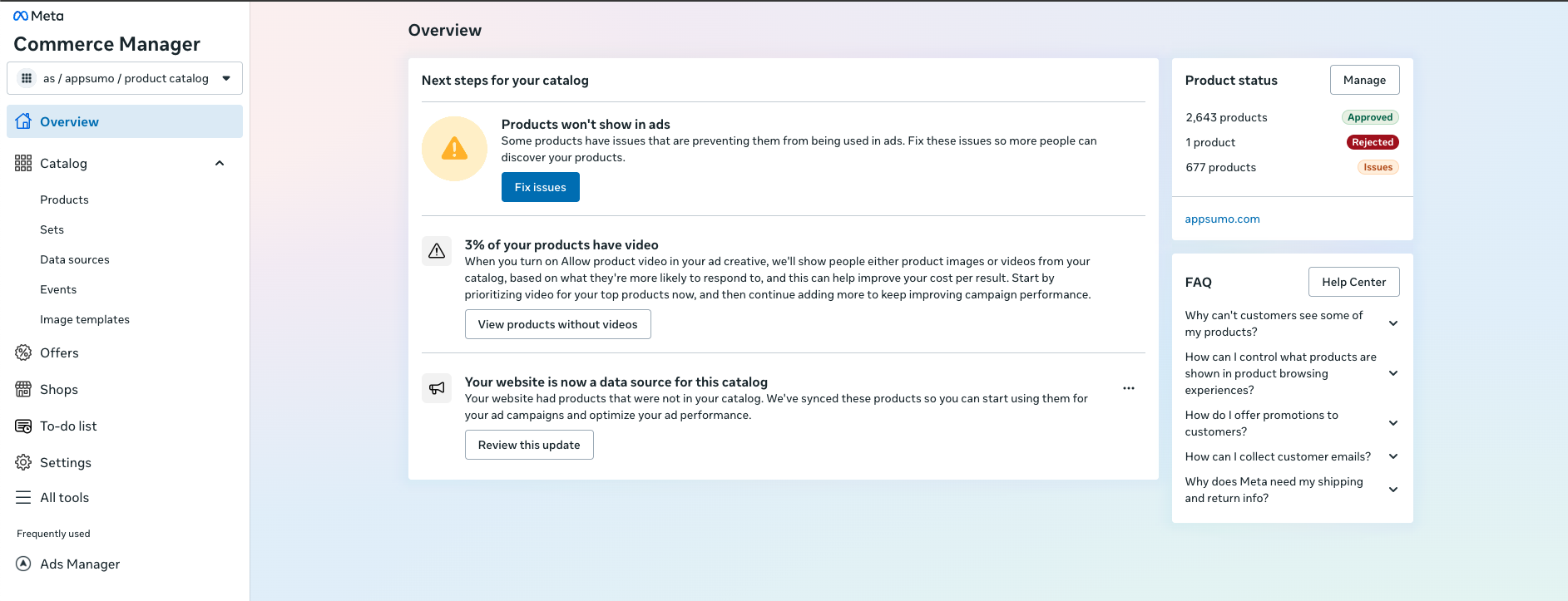
You can see the total product status. Thousands approved. Hundreds with issues. One rejected. A note that only a tiny percentage of products have video. A button that says “Fix issues.”
But the screen does not answer the operator questions:
- Which of these issues actually stop products from showing in ads?
- Which issues are just cleanup work?
- Which products matter enough to fix today?
- Is the problem inside Meta, or is Meta just receiving bad data from Shopify, your feed app, or a custom source?
- If I fix it here, will the next feed sync overwrite it?
- Is the catalog getting healthier or just changing colors on a chart?
That confusion is the post.
Commerce Manager is technically showing you what is happening, but it is not telling you what to do next.
That catalog can feed product sets, dynamic product ads, Advantage+ catalog ads, collection ads, Shops, Instagram product tagging, retargeting, and all the weird little surfaces Meta keeps inventing because apparently one ads interface was not enough.
Google Merchant Center is the same thing on the Google side.
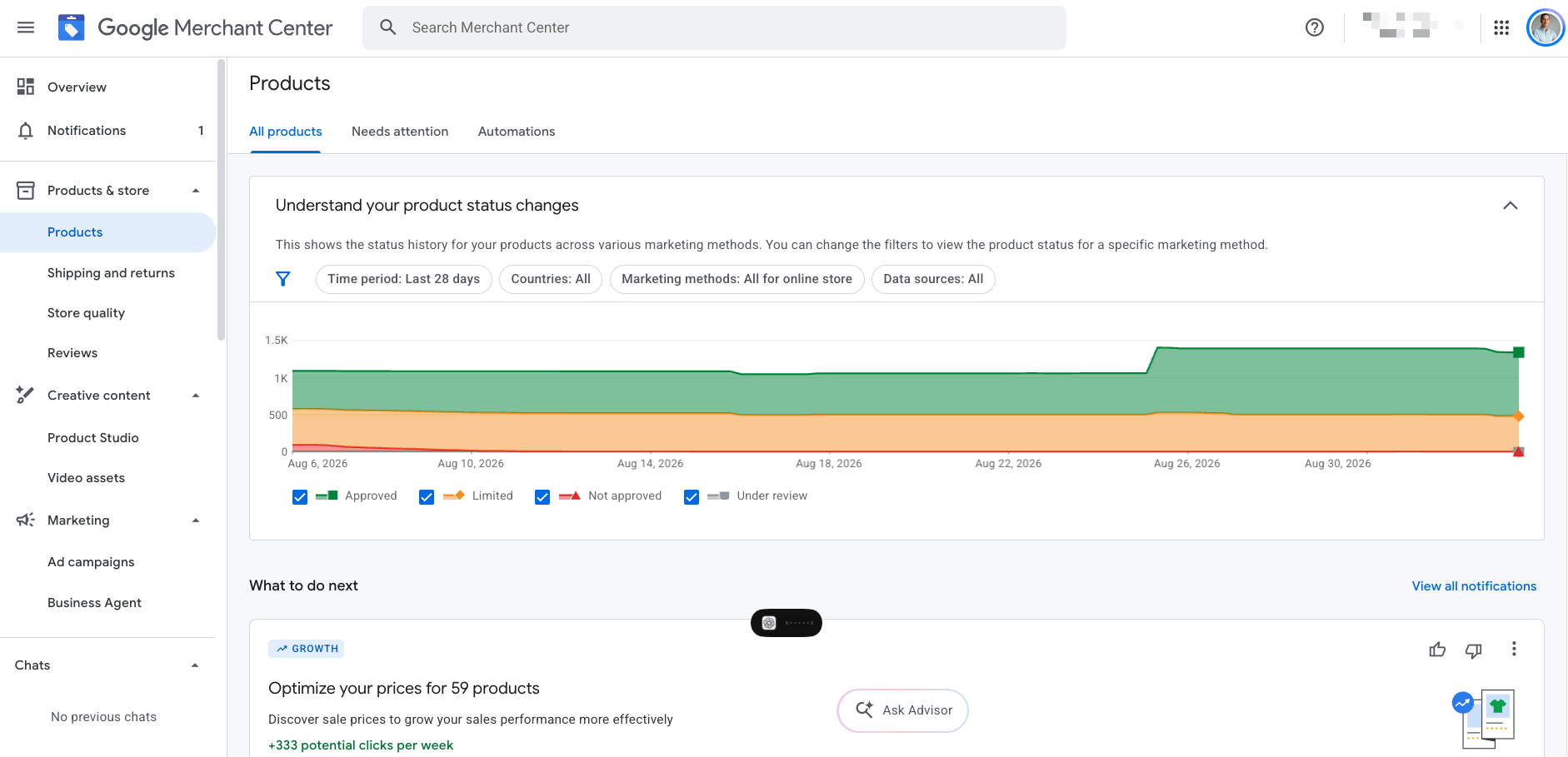
Google shows approved, limited, not approved, under review, price optimization recommendations, marketing methods, country filters, data sources, and status history.
Useful? yes.
Easy to turn into a clear marketing decision? not always.
That is the part worth paying attention to.
The product feed is source material. Your marketing channels use it to decide what products can show, how they show, who sees them, and which products get budget.
Where the feed actually goes
The simple version looks like this:
Shopify, WooCommerce, CSV, XML, API, or PIM
  -> product feed
  -> Google Merchant Center
  -> Meta Commerce Manager
  -> TikTok, Pinterest, affiliate, marketplace, email, and internal tools
  -> ads, free listings, retargeting, product tags, shops, reports, and tests
Google says Merchant Center product data can power free listings across Google and Shopping ads on the Shopping tab. Meta's developer docs describe the catalog as the container for product information used across collection ads, Commerce, Advantage+ catalog ads, Instagram Shopping, and WhatsApp.
Pretty good amount of leverage sitting inside something most marketers only open when there is a red warning.
This is why feed management gets misunderstood. People think the feed is only there so Shopping ads can run. That is where most teams stop.
The better version is using the feed as the operating layer for how products move through your marketing.
Which products are best sellers?
Which ones have inventory?
Which ones have margin?
Which ones are seasonal?
Which ones are blocked from paid channels?
Which ones are getting clicks but no purchases?
Which ones should be excluded because they are stale, low margin, out of stock, or not worth pushing?
If your feed cannot answer those questions, Google and Meta are still going to spend money. They are just going to spend it with less context than you have.
How teams use feeds badly
The most common version is set it and forget it.
The store connects Shopify to Merchant Center. Products sync. Ads launch. Then nobody looks at the feed until something breaks.
That works fine with a small catalog and simple products. It falls apart when the catalog has variants, old products, bundles, seasonal drops, sale pages, country rules, image requirements, missing identifiers, and products that should not all be treated the same.
The second bad version is fixing everything equally.
This is where a team sees 800 feed issues and makes a giant cleanup list. The work looks responsible, but the prioritization is usually wrong. A missing optional field on a product that never spends is not the same as a disapproval on a hero product you are actively trying to scale.
The third bad version is changing the wrong source of truth.
If Shopify owns the product title and your feed app overwrites it tomorrow, fixing the title directly in Merchant Center might make you feel productive for about 11 minutes. Then the next sync runs and your work disappears.
You have to know where the field is actually controlled:
- Shopify product data
- a feed app
- a supplemental feed
- Merchant Center rules
- a custom CSV
- a PIM
- an API job
This sounds boring until you waste three hours fixing the wrong layer.
What a good feed setup does
I have been working through this lately because we started building a product around it. The early version came from a real operator problem, not a fake AI dashboard idea.
If you manage an ecommerce catalog, you should be able to choose a group of products, apply a treatment, preview exactly what will change, publish safely, and roll it back if it breaks.
That sounds obvious. Most feed tools still make you think like a feed engineer before you get to the marketing job.
The workflow I want is more like:
Choose products
Choose treatment
Preview every change
Validate destination rules
Publish
Monitor
Rollback if needed
The important part is the preview.
Before anything goes live, I want to see the exact products affected, the old value, the new value, the destination, the warnings, and the rollback plan.
That matters because Google and Meta do not have the same rules.
Google's image requirements are strict about promotional overlays, watermarks, logos, borders, and text that is not inherent to the product. Meta catalog creative is much more comfortable with promotional frames, sale callouts, product sets, and dynamic creative. A feed change that makes sense for Meta might get you in trouble on Google.
Same product, different destination, different rules.
This is where a lot of teams get themselves into trouble because they think in one catalog. In practice, you need one product truth layer and then destination-specific outputs.
The useful feed fields are usually not default fields
The basic fields matter:
- title
- description
- price
- availability
- URL
- image
- brand
- GTIN or MPN
- product type
- Google product category
- size, color, gender, age group for apparel
But the fields that make the feed useful for marketing are usually the fields you add yourself.
Custom labels are the obvious Google example. Google allows five custom label fields, custom_label_0 through custom_label_4, and says they can be used for reporting and bidding across Performance Max, Shopping, and Demand Gen campaigns.
Five labels is not a lot.
So you have to choose carefully. I would usually want labels for things like:
- margin tier
- hero product or priority product
- sale or promo status
- lifecycle stage, like new, evergreen, clearance, seasonal
- performance bucket, like high click no purchase, high ROAS low spend, or best seller
This is where the feed starts to become a marketing system instead of a product dump.
Now your Shopping structure can treat high-margin products differently from low-margin products. Your PMax reporting can separate best sellers from experimental products. Your Meta catalog can build product sets around the way the business actually merchandises the catalog.
You are giving the platforms better instructions.
The agent version
This is also where AI agents become useful, as long as you keep the job practical.
I do not need an agent pretending it discovered product titles should include keywords. Everyone knows that. I need the agent to pull the catalog, product statuses, issue history, recent ad performance, and business context, then group the mess.
Across thousands of products, I want the agent to tell me:
- which products are blocked in the market I actually sell to
- which issues are probably noise
- which product families have duplicate or weak titles
- which products are live in Shopify but missing from Merchant Center
- which products are in Merchant Center but stale or dead upstream
- which items have spend but no sales
- which products have good conversion rates but not enough traffic
- which products need labels so Google and Meta can be managed cleanly
- which changes should happen in Shopify, the feed app, a supplemental feed, or the platform itself
That last part matters.
The agent should not just tell you what is wrong. It should tell you where to fix it so the fix survives the next sync.
For a small store, that saves time. For an agency or operator managing multiple stores, that is the only way this work scales without turning into spreadsheet archaeology every week.
Free listings are part of this too
Paid ads get most of the attention because spend makes the pain obvious. But catalogs also drive free surfaces.
Google has free listings. Meta has Shops and product tagging. Pinterest has catalog-based shopping surfaces. TikTok has catalog-based shopping and ad products. Marketplaces, affiliates, email, and onsite merchandising can all borrow from the same product truth layer if you set it up that way.
The catalog has to be cleaner than “good enough for ads.”
If your product data is messy, every downstream surface inherits the mess.
Bad title in the feed? That bad title shows up in product ads and free listings.
Wrong image? Same thing.
Out-of-stock product still marked available? Enjoy paying for clicks into disappointment.
No margin label? The platform will not magically know you would rather sell the product that makes you more money.
The feed is where you turn business context into channel context.
My feed management checklist
If I were auditing a new ecommerce account this week, I would not start in Google Ads.
I would start here:
- What is the source of truth?
Is it Shopify, a feed app, a custom file, a PIM, or something else? Which fields are owned upstream and which fields can safely be overridden downstream?
- What destinations depend on the feed?
Google Merchant Center, Meta Commerce Manager, TikTok, Pinterest, affiliate channels, marketplaces, email, internal dashboards. List them. Most teams do not even know where their product data is going.
- What is eligible, limited, or blocked?
Separate real blockers from noisy warnings. Primary country first. Active products first. Products with spend or revenue first.
- What products should not be advertised?
Low margin, low stock, old variants, support-heavy products, dead bundles, products with bad landing pages. Exclusions are underrated.
- What labels does the business need?
Do not let custom labels become junk drawers. Pick the dimensions you actually use to make budget and reporting decisions.
- Where can the feed create better ads?
Better titles, cleaner product types, destination-safe images, product sets, sale templates, variant grouping, video readiness, and promotional frames where allowed.
- What can be rolled back?
If you cannot preview and roll back a bulk feed change, you are one bad sync away from ruining your afternoon.
The bigger point
The product feed is one of those boring places where good ecommerce marketing actually happens.
Creative matters. Landing pages matter. Offers matter. But if the catalog is messy, every channel is working from messy inputs.
And the worst part is you might not even know.
Merchant Center will show you warnings. Commerce Manager will show you issues. The ad account will show you spend. Shopify will show you sales. None of those tools will automatically tell you the clean business answer:
Are the right products showing in the right places with enough context for the platform to sell them well?
That is the actual job.
Once you see the feed that way, it stops being plumbing. It becomes one of the most important marketing assets in the business.
It is not sexy and nobody is bragging about custom labels at a founder dinner.
But if you run ecommerce, the catalog is where a lot of the truth lives.
Get that right and every channel downstream gets easier.