I've gotten pretty particular about which AI I open. Codex is my main coding client and the one I prefer for writing. Claude Code is good when I want to dig into something, but ask it for a short answer and I usually end up editing a small essay.
ChatGPT gets the questions I have while living my life. I'll show it a Wi-Fi screen, research a trip, or spend twenty minutes talking through something in voice. Grok Bot gets the jobs I want it to keep checking while I'm elsewhere, from Slack digests to finding an early tee time.
That's the setup I've settled into through using all four. The same tool that helps me build an app isn't always the one I want to have a conversation with, and liking an AI's research doesn't mean I like its writing. Those preferences have shaped how I work with them more than any feature comparison.
I wrote about my broader tech stack in July. This is how I actually use the AI tools themselves, what I reach for each one to do, and how the work moves between them.
Codex is where most of my building and writing happens
Codex is my main coding AI client now. It's where I want to sit with a project, work through what it should do, make the changes, and see whether they work. I also like its writing and how it handles my voice, which is why NickBuilds lives here.
A lot of these conversations start with a screenshot and me saying something like, “Wait, why are there two different places to do this?” I don't always have a specification ready. Sometimes I just know the screen is confusing or the behavior doesn't make sense.
One recent example was a product workflow with both a Projects section and a Studio section. I asked what the difference was supposed to be. We worked through it, decided they were duplicating each other, and consolidated the workflow. That conversation went from figuring out what the product should be to changing it and checking the result.
Then I noticed that regenerating an approved image left the replacement marked approved. I hadn't approved that new image. So back into the same conversation: here's the screenshot, here's what happened, fix the behavior.
That's a lot of how I use Codex. I try the thing, react to it, show what feels wrong, and keep going. Having the conversation, files, code, and result together makes that loop easier for me.
I use it for marketing work too. I can ask it to check whether the ads and landing pages agree, compare sales data with platform reporting, or dig into why a number changed. Then I'll push on the answer. Are those the same dates? Does that figure include existing buyers? Is that what the campaign actually promotes, or are we trusting its name?
Once I understand the answer, I often want a short update I can use. Codex can do the investigation and help me get down to the few sentences that matter. I still have to decide what those sentences should say.
Writing here follows a similar pattern. I talk through an idea, give it examples, and tell it where the point is getting lost. It has access to my voice profile and past posts, so we have something concrete to work from. If the draft sounds too clean or starts doing that dramatic one-sentence-per-paragraph thing, I push it back.
I like being able to go from doing the work to writing about it without explaining the whole situation again. This post started that way, by looking at how I've actually been using the tools.
Claude Code is where I go deep
I still use Claude Code a lot, especially for deeper research, data pulls, and working through the machinery behind a process. When I want to investigate something thoroughly, it is happy to keep digging.
Sometimes a little too happy. In my experience it tends to give me more answer than I wanted, and I spend more time cutting its writing down. I don't reach for it first when I want something short that sounds like me. That's a preference from using it, and it's a big reason I keep the writing here in Codex.
Where Claude Code earns its place is when I want to follow the problem down into the details. Read the files. Check the integrations. Work out what the data means. Look at how a scheduled job runs and what happens when it fails. There are times when I want that level of thoroughness.
I've used it to build scripts, connect tools, write reusable skills, and put operating rules into the repositories where the work lives. If a workflow needs to read data from one place, apply some rules, prepare an output, and leave a record of what happened, Claude Code is comfortable getting into all of that.
The newsletter system is one example. There are templates, voice instructions, scripts, and checks around campaigns. Getting those pieces right means the next draft starts from a process we've already worked through. I don't want to rediscover how the newsletter works every Wednesday.
Codex does systems work too. I don't have a hard border where one tool gets every app and the other gets every script. Codex is my default for building now; Claude Code is still a place I like to go when I want to spend more time inside the details.
ChatGPT gets everything that happens around the projects
ChatGPT is probably the closest one to my everyday life. A question comes up and I open it. Flights, furniture, something around the house, a bug I found outside, a book I'm reading. Half the time I would have Googled it before, except now I can keep asking questions as I figure out what I need.
The Wi-Fi example is a good one. I can show it the networking screen, explain where I'm standing, tell it which light is on, and ask what to check next. Then I try that and come back with another screenshot. I don't need to know the right technical term before the conversation can start.
I use photos this way constantly. Something won't connect, a part looks wrong, a piece of furniture doesn't seem to match the listed dimensions. Showing it what I'm looking at gets us into the useful part faster.
And I challenge the answers. If it looks like it guessed, I tell it to research. If the recommendation doesn't fit the situation, I give it the missing detail. I want to know where the answer came from, especially if I'm about to buy something or act on it.
Voice is a huge part of why I like it. I think well by talking, and sometimes I want a longer conversation that can wander a little. I've used it to talk through books like The Odyssey, follow a history question somewhere interesting, or think through a decision without having to turn it into a neatly written prompt first.
Those conversations don't always need to produce a document. Sometimes I just understand something better afterward. That is a perfectly good use of AI.
Grok Bot keeps an eye on the recurring stuff
Grok Bot has become the place I give ongoing responsibilities. I have Bots for Slack notes, tee times, dinner reservations, metrics, and weekly update drafts. Each one has a specific job, and I can go back to that conversation when I want to change how it works.
The tee-time Bot is a good example because the request is simple and the execution is annoying. I want an early time for the right number of players. Availability changes. I have zero interest in refreshing a booking site throughout the day.
So I give the Bot the date, time window, group size, and booking rules. It watches. If my plans change, I tell it. When it suggests something ridiculous like afternoon golf in the Texas heat, I tell it that too.
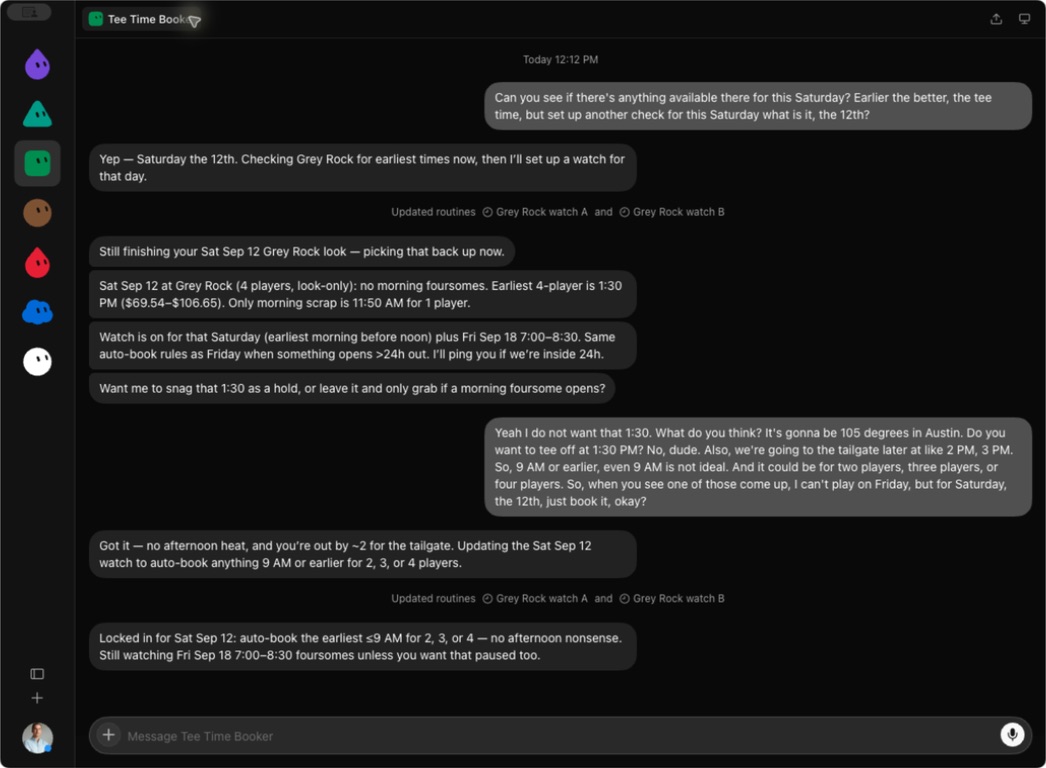
Apparently “earlier the better” needed a little more detail. This is the watch being updated, not a confirmed booking.
The useful technical detail is that Grok Bot works on a persistent cloud computer with a browser. Its cloud work can continue when my laptop is closed, and browser sessions can persist between tasks. That matters for a job where the opportunity might show up while I'm doing something else. Here's how its computer works.
The work examples are less entertaining but probably more useful. I have a weekday Slack digest at 8 a.m., meeting-note routines, and a Friday update draft. Those are responsibilities with a schedule. I want the relevant information waiting for me so I can read it, make a decision, and move on.
Having a separate Bot for each job helps me keep track of it. I know where to go to change the meeting-note format and where to go to change a tee-time window. I don't have to dig through a giant conversation that contains both.
There are still rough edges. The dinner-reservation Bot recently reported that it couldn't get onto a waitlist because the booking site kept erroring. A browser login can expire. A source can be missing. I want those failures reported plainly so I know the task didn't happen.
Also, the Bots share one computer and its logins. Separate conversations don't mean separate private machines. I keep that in mind when deciding what access to give them. The official docs spell out that distinction.
For messages and newsletters, my rule is that they prepare the draft and I approve what goes out. Booking has its own explicit limits. Giving a Bot a recurring job still means being clear about the decisions it can make.
How the tools connect
Most of the handoffs are pretty straightforward. I work through something in one tool, then take the useful context to the next. Sometimes that's a brief. Sometimes it's a file or a repository that both coding tools can read.
I've worked through an automation idea in Codex and asked it to write the implementation brief I could take to Claude Code. For this post, I did something similar in reverse. I asked the other tools to describe how I've been using them, brought those notes into Codex, and compared them with the actual conversations.
They didn't all agree. Claude Code's description gave Codex much less credit for building than it deserved. ChatGPT's description barely mentioned that I like writing here. Reading those summaries was a useful reminder that I still need to supply the full picture.
Shared files help. My voice profile, project notes, and reusable instructions give the next conversation somewhere to start. But I still tell the tool what we're doing, what changed, and what I want from it.
And yes, the conversations themselves can break. My main NickBuilds chat ran out of context while I was trying to plan this post. Even the request for a handoff prompt failed.
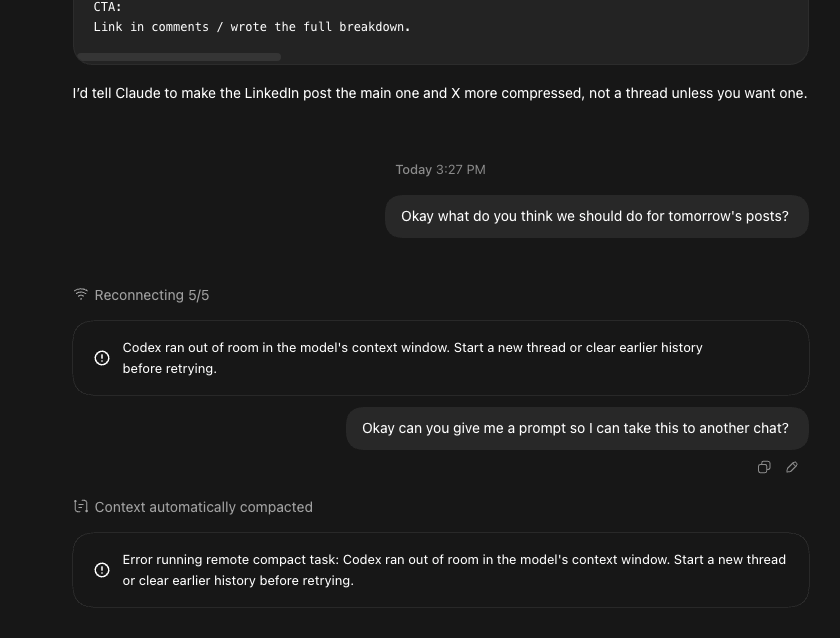
A slightly inconvenient time for the AI to stop being helpful.
We recovered the recent direction from the old conversation and the saved files, then started here. It was frustrating, but it didn't mean the work was gone. I want the important context somewhere I can get back to when a chat stops cooperating.
Where I'd start
If you're trying to work out your own setup, pick something you already do often. Give it enough context to be useful, then see whether you like working with it. A real task will tell you much more than asking each model which model is best.
For me, Codex is the first place I go to build or write. Claude Code gets the deeper investigations and systems work where I want to stay in the details. ChatGPT gets the questions and conversations that come up during life. Grok Bot watches the things that need attention when I'm elsewhere.
The tee-time watch is still running. It knows the morning window now. I'll count that one as finished when there's a booking confirmation.