For two years the only way to plug Claude or ChatGPT into a Meta ad account was through a third-party connector someone built on the side. Every API call routed through their developer app. If their app got flagged, your ad account caught the same review.
Most operators wouldn't touch it. Not because the tools were bad. Because the ban risk was real.
Meta just fixed that.
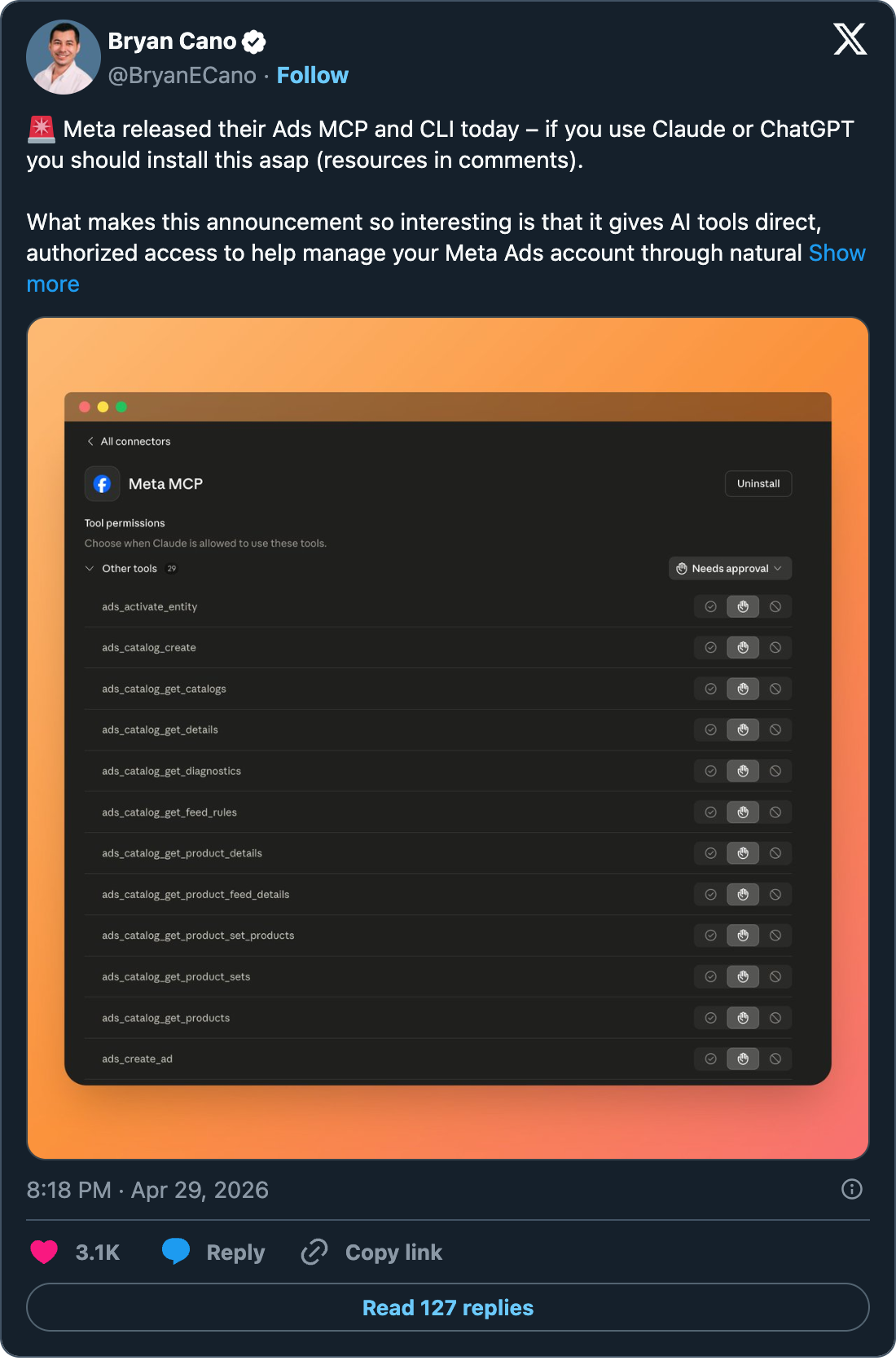
Yesterday they dropped an official CLI and MCP server for the Marketing API. Both built and maintained by Meta. Both authenticated with your own Meta Business OAuth, no developer app required. Twenty-nine tools across reporting, campaign management, catalogs, and signal diagnostics.
This is the gap every Meta + AI workflow has had. It's gone now.
What Meta actually shipped
Two things, same API underneath, different transport.
The MCP server is HTTP-based. Drop a URL into your Claude Desktop or ChatGPT config, OAuth into your Meta Business account, done. Setup is about 90 seconds.
The CLI is a local Python binary that exposes the same operations to terminal-based agents. Claude Code, OpenAI Codex, anything that can run a shell command. Setup is more like 10-15 minutes because you install it on your machine.
Both hit the same Meta Marketing API. Pick by where you actually use Claude.
For me that's Claude Code, so the CLI is what I've been testing.
The 29 tools
Five categories:
- Campaign Management (5 tools): create campaigns, ad sets, ads, update entities, activate them
- Product Catalog (10 tools): create catalogs, manage feeds, run diagnostics, look up products, manage sets
- Accounts & Assets (3 tools): account discovery, entity lookups, Page connections
- Dataset & Tracking Quality (4 tools): Pixel and CAPI diagnostics, event statistics, matching quality scores
- Performance & Insights (7 tools): anomaly detection, benchmarks, trend analysis, opportunity scoring, Help Center retrieval
You can read all of it. You can write most of it. The signal diagnostics piece alone is worth the install if you've ever had to debug a wonky pixel.
Why this matters more than it looks
The first thing every operator wants to know is: can I use this without getting my ad account banned?
Yes. That's the entire point.
Before yesterday, every "Meta MCP" you saw on GitHub was someone's personal developer app sitting in the middle of your account. Those apps could get flagged for any number of reasons that have nothing to do with you. If they did, you got pulled into the review. I've seen people lose their primary ad account over a side project they didn't write.
The official path removes the middleman entirely. Your token, your OAuth, direct to Meta. Claude Code parses the output and that's it. No third-party app to flag, no shared review surface.
For agencies running multiple clients this is a much bigger deal than for solo operators. One bad MCP could've taken down a whole client roster.
What I'm rebuilding around it
I've been running Google Ads workflows through n8n and Claude Code for months. The Meta side has been a gap because of the ban risk. With this release I'm pulling the same playbook over.
Four workflows I'm setting up this week:
1. Daily performance pull with anomaly detection. Runs at 7am. Pulls last 24 hours of campaign performance, compares against trailing 7 and 28 day averages, flags anything more than 2 standard deviations out. Lands in Slack before my first meeting. Same pattern as my Google Ads daily Slack output, just on Meta data.
2. Weekly creative fatigue report. Every Monday morning. Finds every ad with frequency over 3.0, every ad with CTR drops over 20% week-over-week, every ad with CPM creeping up. Surfaces refresh recommendations attached to actual data. This is the report most agencies promise and never deliver.
3. Client reporting workflow. For RAX Digital. Monthly performance dashboard generated as a single HTML file with the right charts, exec summary written in the client's brand voice. No more building decks from scratch. Same approach Mike Lewis at SCALE AI showed in his email yesterday, where he had Claude Code build a 30-day dashboard for his account in about 90 seconds end-to-end.
4. New campaign launch baselines. When I'm spinning up a new campaign for a client, I want historical baselines for similar campaigns in similar verticals so I know what day-one performance should look like. The CLI lets the agent pull this from any account I have access to and write the briefing automatically.
None of these are theoretical. They're all things I was doing manually or partially automated through Google Ads while waiting for Meta to catch up.
The honest limitations
A few things to flag before you go all-in:
Free during beta, no commitment after. Meta hasn't said what the pricing model is post-beta. Right now there are no rate limits in their internal tests but no contractual promise to keep it that way. Build for portability.
Write operations are dangerous. The agent will create campaigns and update budgets if you let it. I'm running mine in dry-run mode for the first two weeks until I trust it. Anyone who skips this step will eventually have a bad day.
Not for sub-second bid management. This is for reporting, analysis, and human-in-the-loop changes. It's not built to replace Smart Bidding or live-auction tools.
Strategic context still missing. The agent doesn't know that you're investing in a campaign with low ROAS because you're testing a new offer. It sees the numbers, you see the strategy. Same caveat as every AI-in-ads workflow.
How to actually set this up (no technical skills required)
Two paths. Pick the one that matches the app you already use.
If you use Claude Desktop or ChatGPT (the easy way, 5 minutes)
This is the MCP path. You don't install anything. You just connect your Meta account to your Claude (or ChatGPT) app.
Step by step:
- Open the Claude Desktop app on your computer.
- Click your name in the bottom-left corner, then click Settings.
- In the sidebar, click Connectors (might be called Integrations depending on your version).
- Click Add custom connector.
- In the URL field, paste this exactly:
https://mcp.facebook.com/ads - Give it a name like "Meta Ads" and hit Save.
- Claude will pop open a browser window asking you to log in to Facebook. Log in with the account that owns or manages the Meta Business Manager you want to connect.
- Pick the ad account you want Claude to access from the list it shows you. Approve.
- Done. Close that window and go back to Claude.
To test it, open a new Claude chat and type: "Pull my last 30 days of Meta ad performance and write me a one-page summary." If you get real numbers back, it's working.
If you use ChatGPT instead, the steps are basically the same but you go to Settings > Connectors in the ChatGPT app and paste the same URL.
If you use Claude Code (the longer setup, 10-15 minutes)
This is the CLI path. You install a small program on your computer, authenticate it once, and Claude Code calls it whenever you ask about Meta ads.
You'll need Python on your machine. If you don't know if you have it, open Claude Code and ask "do I have Python 3.12 or higher installed?" It will check and tell you.
Step by step:
- Open Claude Code.
- Tell it: "Install the Meta Ads CLI from Meta's official docs at developers.facebook.com/docs/ads-cli. Use pip or uv to install it. Set it up so I can call it from Claude Code."
- Claude Code runs the install commands. If anything errors, paste the error back to it and ask it to fix.
- Tell it: "Authenticate the Meta Ads CLI with my Meta Business account." It opens a browser window for OAuth. Log in, pick your ad account, approve.
- Claude Code stores the auth token in your environment (don't paste this into a chat or commit it to GitHub, ever).
- Tell it: "Test the connection by pulling my last 30 days of campaign performance."
If you get real numbers back, you're set. If not, paste the error to Claude Code and it'll walk you through the fix.
What to do once it's working
Don't try to build something complicated on day one. Run a few read-only prompts first to make sure your data is coming through clean:
- "What's my spend, impressions, and CTR for the last 7 days, broken down by campaign?"
- "Which of my ads have a frequency over 3.0?"
- "Show me my top 5 campaigns by ROAS this month."
Once you trust the data, then start building daily reports, weekly creative reviews, and the rest. Do not give the agent permission to create or edit campaigns until you've watched it for a week. Write operations are where the bad days live.
The official docs are at developers.facebook.com. Bookmark them. Don't trust a random Twitter thread for setup steps, including this one. If something looks different in the actual Meta UI, trust Meta's docs.
This is the legitimate, Meta-blessed path. The third-party era is over. If you've been waiting on AI to actually plug into your Meta account without the ban risk, that wait ended yesterday.
I'll write up the daily Slack workflow once it's been running for a week and I have real numbers. That post is coming.